PixelTrader
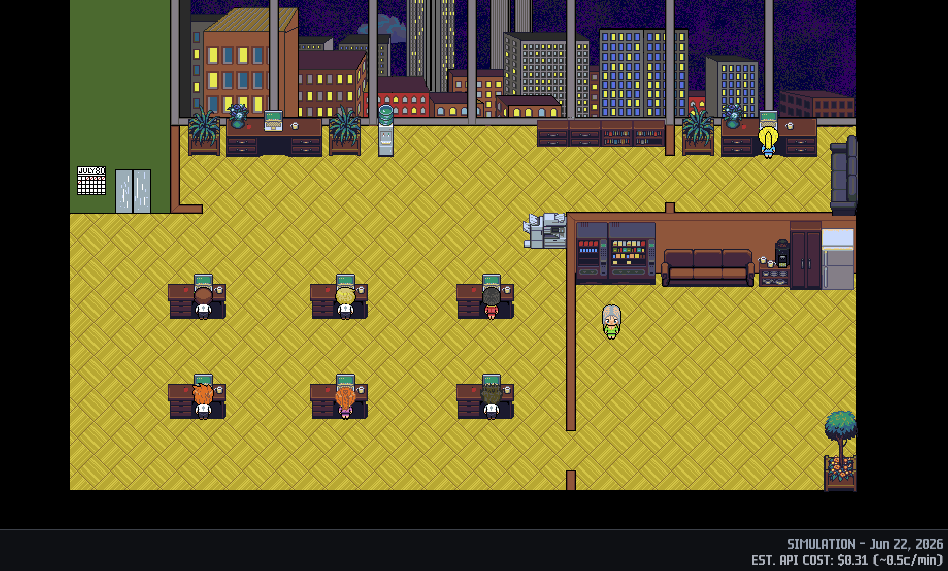
A pixelized trading floor.
Free, and stays free.
Windows will show a “Windows protected your PC” screen the first time you run this. That is SmartScreen not recognising a new publisher — not a warning about the file. What to click, and why it happens.
Verify your download
SHA-256 of PixelTrader_Setup.exe:
A1170042391C5D8DA2F7716D48EB7458D0E3665BF59EBCF10D2EFAF0BA878B15
Open PowerShell — Start menu, type PowerShell, press Enter — then paste this and press Enter:
Get-FileHash "$HOME\Downloads\PixelTrader_Setup.exe" -Algorithm SHA256
If that says it cannot find the path, your Downloads folder is
somewhere else — OneDrive moves it on some machines. In that case
type Get-FileHash followed by a space, then
drag the downloaded file from File Explorer onto the PowerShell window.
That fills in the full path for you. Press Enter.
The hash it prints should match the one above. If it does not, delete the file and download it again — and tell me at ben@mazamagames.com.
What this is
PixelTrader is a trading floor you manage rather than a bot you switch on. Eight brokers each cover a market sector. Every round they look at real price data, pick something they want to buy or sell, and tell you why in a sentence. You approve it or you pass.
They have opinions. At times they hold positions through drawdowns, take profits early, get things wrong, and carry the consequences into the next round — a broker who loses money enough times can be fired and replaced. Over time, with your coaching, the brokers will begin to execute in line with your trading philosophy and strategy as a team across a diversified floor.
Nothing real trades without you. Every order requires an explicit approval. With real money there is no autonomous mode, no "let it run overnight" setting, and no way to switch the approval step off — it is structural, not a preference. Real-money trading additionally requires arming the floor from the leaderboard banner, and arming resets every time you close the program.
The three modes
| Mode | Money | Prices | When you can play |
|---|---|---|---|
| Simulation | None | Real, from a past 90-day window | Any hour, any day |
| Paper | None — your Alpaca paper account | Live | Market hours |
| Real | Your own money | Live | Market hours |
Start in simulation. It replays a real 90-day stretch of market history. The floor runs at the hours you want to play, not strictly the market hours like in paper and real mode. It is the same software with the same brokers and the same limits — the only difference is that none of it reaches a brokerage. The brokers' reasoning can't see the future prices so the run stays honest. This is the best mode to learn the game and refine personal strategies.
What you'll need
PixelTrader is free, but it does not include the services it runs on. You bring your own accounts, and the keys never leave your machine.
1. An Alpaca account — required
This is where the market data comes from, and where paper or real trades go if you use those modes. Free to open. You generate your own API keys and paste them into the game.
2. Something for the brokers to think with — pick one
Every round, each broker reads the market and writes its reasoning. That runs on an AI model, and you choose which.
A cloud provider — easiest to set up. Create an account, generate a key, paste it in. You pay the provider directly for what you use.
console.anthropic.com · platform.openai.com
Or run a model locally with Ollama — free to run, no per-minute cost, nothing leaves your computer. It takes more setup: install Ollama, pull a model, and leave it running while you play. Reasoning quality depends on the model you choose, and smaller models are noticeably less articulate than the cloud ones.
If you use a cloud provider, running the floor costs real money — including in simulation. Every round is a live call to your AI provider. Roughly 2.5¢ per minute of play on Claude Sonnet and half a cent per minute on GPT — call it a dollar or two for a long evening. Ollama avoids this entirely. The download is free; the electricity is not.
Your keys stay on your machine. They are stored in Windows Credential Manager on your own computer, sent only to the service they belong to, and never to us. Mazama Games could not see them if it wanted to — there is no server to send them to.
What it takes to run
Two very different answers, depending on where the model runs. The game itself is light — it is pixel art and text. The model, if you host it yourself, is not.
| Using a cloud model | Running a model locally | |
|---|---|---|
| Windows | 10 or 11, 64-bit | 10 or 11, 64-bit |
| Download | 36 MB | 36 MB |
| Graphics card | None. Integrated graphics is fine | 24 GB of VRAM recommended |
| System memory | 8 GB | 16 GB or more |
| Extra disk | A few MB for saved data | 16–20 GB for the model itself |
| Ongoing cost | Per-round charges from your provider | Electricity |
If you are using a cloud provider, that is the whole list. Any computer that can run Windows 10 or 11 can run PixelTrader, because all the thinking is happening somewhere else. You do not need Python or anything else installed — the download is a normal Windows installer with everything already inside it.
Why local is so much heavier
Every round, each of the eight brokers makes its own separate call to the model. Eight rounds of reasoning, one after another, before the round is done. A cloud provider absorbs that without you noticing. Your own graphics card does not — whatever a single response costs you in seconds, multiply it by eight to get the wait between rounds.
That multiplier is why the VRAM figure matters more than it would for ordinary chat use. A model that fits entirely in your graphics card's memory answers quickly. One that spills over into system memory, or runs on the CPU alone, still works — but at eight calls a round it turns a game into a slideshow.
Model size is a real limit, not a preference. Below roughly 27 billion parameters, reasoning quality drops off sharply and smaller models frequently return output the game cannot read at all, which costs you the round. If your hardware cannot hold a model that size, a cloud provider will give you a far better experience than a small local model will — and in simulation mode it is costing you cents, not dollars.
How a session goes
- Pick a mode and, on a new floor, pick which eight market sectors your brokers cover.
- The floor opens. Brokers scout their sectors, then start proposing.
- A proposal appears with a price, a size, and a one-line argument. Approve or pass.
- Click any broker to see their book, their cash, and their record. Coach them — tell one to stop chasing momentum, or to hold what they have.
- Every hour they take a break. Somebody wanders to the vending machine. The floor keeps its own rhythm whether or not you are watching.
The limits are not suggestions
A broker cannot spend more than about 13% of their equity on one position, cannot hold more than six positions, and cannot dip into a 15% cash reserve. A day-loss stop halts a broker who is down 30% on the day. An account-level breaker halts everything at 50%, and stays tripped through a restart until you acknowledge it. None of these can be turned off.
What's coming
PixelTrader will stay free, permanently. The next release is a separate, paid product rather than a paywall on anything you already have.
PixelTrader 24/5 adds overnight and extended-hours trading, and a dedicated round-the-clock crypto floor — sessions that do not stop when New York does.
About that Windows warning
The installer is not yet code-signed, so Windows will show a "Windows protected your PC" screen the first time you run it. That is SmartScreen not recognising a new publisher, not a warning about the file. Click More info, then Run anyway. A signed version is coming.
If you would rather confirm the file is exactly what was published before running it, the SHA-256 checksum is under Verify your download next to the download button above.
No claims about returns. PixelTrader is software, not advice. It does not predict markets, does not recommend securities, and makes no claim that any broker, strategy, or configuration is profitable. Trading involves risk of loss. Mazama Games is not a broker-dealer, an investment adviser, or a custodian, and never holds your money or your credentials.